 etke.cc
Honoroit bot
made by etke.cc
The Honoroit bot installed by us is powered by honoroit.
This page shows you how to set up Buscarron using FluffyChat client app (available as an add-on component).
Overview
Honoroit is a Matrix bot developed by etke.cc. It is a specialized helpdesk bot designed to streamline support interactions within the Matrix ecosystem.
By emulating the capabilities of website chat systems like Intercom and Jivosite inside Matrix (no web), Honoroit offers a robust and user-centric solution for helpdesk support, seamlessly integrating into the Matrix platform for efficient and secure communication.
Features
Here is a list of Honoroit’s main features:
Threaded Conversations
Proxy messages from any Matrix user to a dedicated room, creating threaded conversations for efficient collaboration, and engage with users through Honoroit within a dedicated room, enabling multiple team members to participate in discussions.
Request Fulfillment Workflow
Mark requests as done using the
!ho donecommand. Honoroit renames the thread topic and notifies the user, gracefully leaving their room with a special notice.End-to-End Encryption
Ensure the privacy and security of conversations with end-to-end encryption, maintaining data confidentiality.
Chat-Based Configuration
Configure Honoroit effortlessly through chat interactions, making it easy for operators to adapt and manage settings on-the-fly.
Usage
To use the bot, start a chat with @honoroit:your-server.com. You can also add the bot to any existing Matrix room by inviting it to the room (/invite @honoroit:your-server.com).
Make sure to replace your-server.com with your actual “base domain”. Setting your-server.com or example.com does not work on your server!
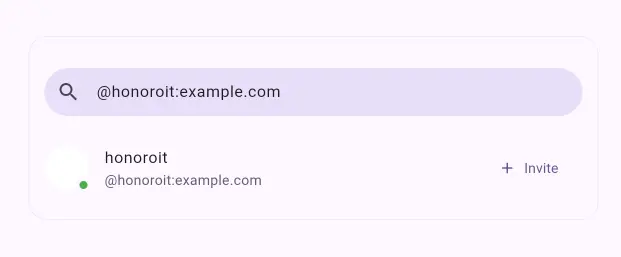
After the bot joins the room and a user in the room send a message, you will receive the message’s copy in the operators room.
You can reply to the message directly by sending a reply to the transferred message in a thread as below.
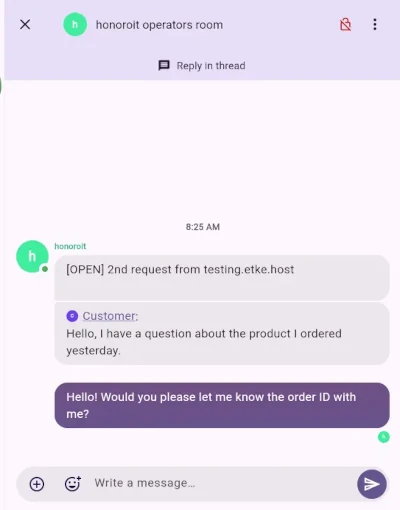
The bot automatically sends a greeting message to the user as soon as they send a message to the room, and then it sends the messages replied in the thread to the room in favor of you.
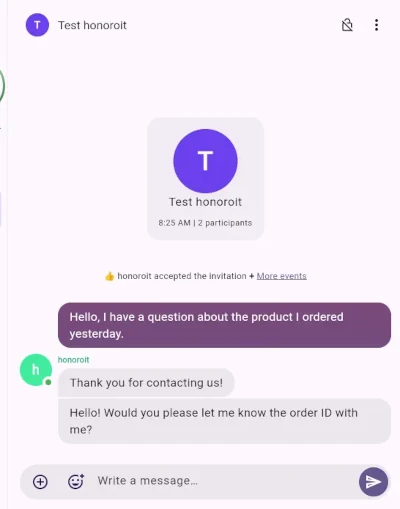
Because every conversation is managed in the thread for each of them, it is possible to manage inquiries from your users without hassle!
Available Commands in Threads
!ho done: Close the current request, mark it as done, and notify the customer. The bot will gracefully leave the 1:1 chat with the customer.!ho rename TXT: Rename the thread topic title.!ho note NOTE: Keep private notes for operations in a thread with a customer.!ho invite: Invite yourself into the customer’s 1:1 room.!ho start MXID: Start a conversation with a Matrix ID from the Honoroit bot.!ho count MXID: Count a request from a Matrix ID without creating a room or inviting them.!ho config: View all configuration options.!ho config KEY: View a specific configuration option and its current value.!ho config KEY VALUE: Update the value of a specific configuration option.
Power up with Honoroit
Start using Honoroit today - get a managed Matrix server with it pre-installed, or add it to your existing setup.