 etke.cc
Email bridge
made by etke.cc
The Email bridge installed by us is powered by postmoogle.
Features
What the email bridge can do
Receive
| Feature |
|---|
| SMTP server (plaintext and SSL) with live SSL certificate reload |
| Receive emails to Matrix rooms with attachments |
| Subaddressing support (you@domain+tag) |
| Mailbox aliases and catch-all mailbox |
| Strip forwarding, signatures, and other noise from incoming emails |
| Map email threads to Matrix threads |
| Multi-domain support |
| SMTP, DKIM, SPF, RBL, and MX verification |
| Spamlist of emails and hosts (wildcards supported) |
| Greylisting |
Send
| Feature |
|---|
| SMTP client with relay host support (global and per-mailbox) |
| Send emails from Matrix rooms with special message format |
| Reply to email threads from Matrix threads |
| Email signatures and autoreply / autoresponder |
| Can be used as a general-purpose SMTP server for scripts and apps |
This page shows you how to set up the email bridge using Cinny client app (available as an add-on component).
Overview
With the email bridge, you can:
- receive emails to custom addresses (like
something@matrix.example.com) and have these emails delivered to Matrix rooms - send outgoing emails
- and many more things
Usage
To use the bridge, create a room and invite @emailbot:your-server.com (or @postmoogle:your-server.com if your server was installed before October 2023).
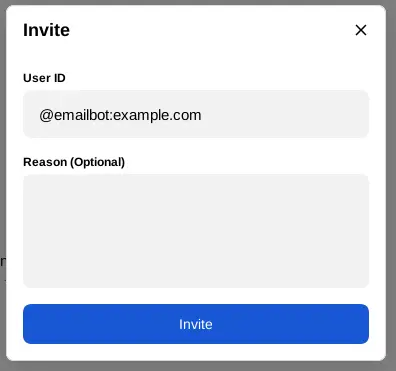
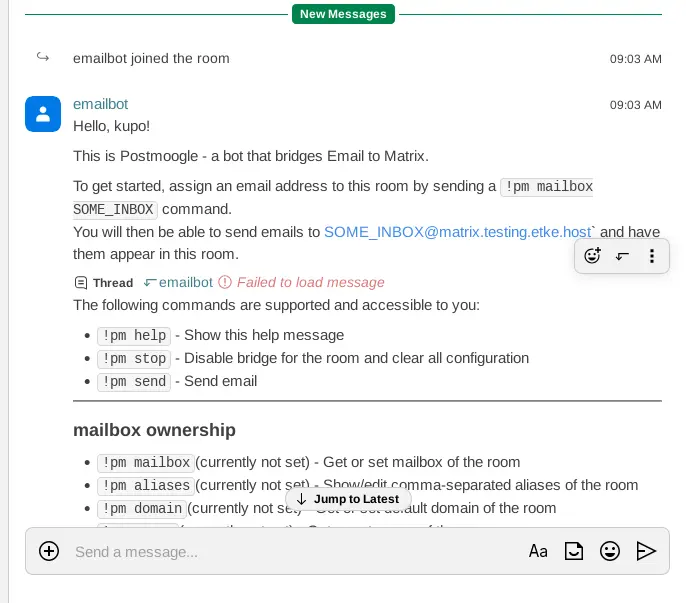
When it joins, the bot sends a help message to the room. You can receive the instruction by sending !pm help as well.
Creating a mailbox
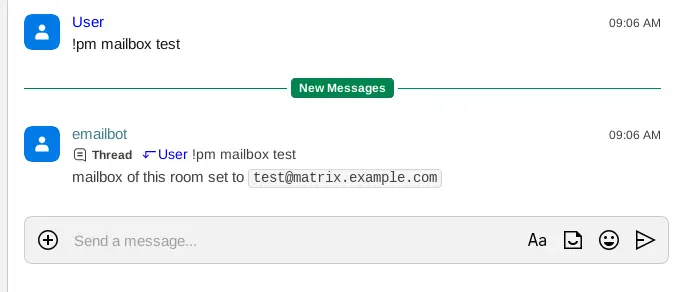
To create a mailbox, send !pm mailbox SOME_INBOX to the bridge’s bot.
The bot returns the mail address which you can use to receive messages to SOME_INBOX@matrix.your-server.com and send messages using the !pm send command.
Registering DomainKeys Identified Mail (DKIM)
To avoid messages from being quarantined as spam at recipient’s mail servers, it is essential to set an authentication method such as DKIM, SPF, and DMARC for your hostname.
You can set DKIM by following the steps below:
- Send
!pm dkimto the bridge bot and copy the signature from the bot response - Add new DNS record with type =
TXT, key (subdomain/from):postmoogle._domainkey.matrixand value: signature copied from the!pm dkimresponse
After configuring DKIM, it is recommended to check mail deliverability by using online services like mail-tester.com, dkimvalidator.com.
⚠️ Note: even if your configuration is complete, it is likely that you will experience deliverability issues due to numerous unknown factors regarding high centralization around big email service providers (e.g., Gmail, Outlook, Yahoo, etc.)
Power up with Email bridge
Start using Email bridge today - get a managed Matrix server with it pre-installed, or add it to your existing setup.