 etke.cc
Which Matrix client should you use?
We install Element on your server by default, so day one isn’t a blank screen. When a friend asks us what to actually use, we say Komai on the desktop, Cinny in the browser, and FluffyChat on a phone.
Why not the one we installed for you? Element loses people. A few of ours gave up on Matrix entirely over its interface, which is about the worst review you can hand a chat app, and we took it personally enough to go build better ones.
Matrix is an open protocol, so any client that speaks it works with your server, running on your own machine or hosted wherever you like. Your favorite isn’t on this page? Use it anyway. Your server won’t mind.
Komai, on the desktop
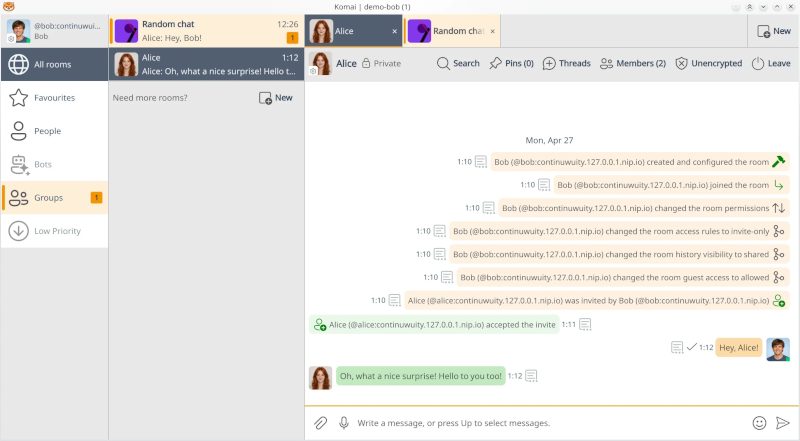
Komai is our own client, so yes, we’re biased. We built it because we wanted one we’d enjoy using. It’s native (Rust and C++, no Electron), so it opens fast and your laptop fan doesn’t spin up because you opened a chat app.
You already have too many browser tabs open. Komai gives your rooms their own tabs across the top: pin the ones you live in, flip between them, and they’re right where you left them after a restart. Almost no other Matrix client does this, and it’s the one you’ll miss the second you go back.
A few more it gets right:
- Calls are built in. Element Call (voice and video, one-to-one or group, encrypted) is enabled by default in any room.
- The room directory ships pointed at matrixrooms.info. Open it and there’s a real index of public rooms already there, nothing to add by hand.
- It’s built to live in. Separate profiles for separate accounts, a keyboard and Vim workflow if that’s your thing, message effects and custom emoji, and themes that follow your system into dark mode.
Want the full tour? Komai’s own page has the screenshots, the whole feature list, and the download details.
Komai is desktop only today (Linux, macOS, Windows). No mobile build, and we’re not going to pretend the roadmap is the present. For a phone, keep reading.
Grab it from komai.chat, GitHub releases, or the AUR (komai and komai-bin).
Cinny, in the browser
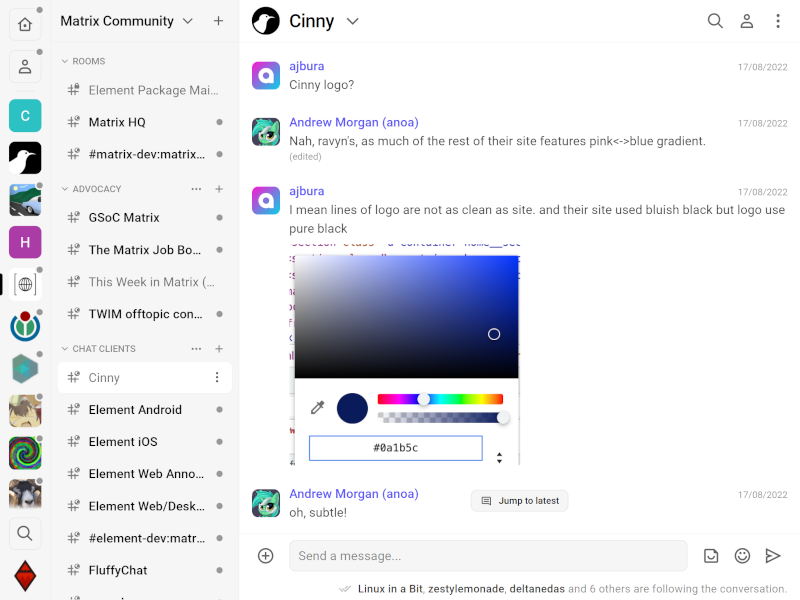
If you’d rather keep Matrix in a browser tab, Cinny is the one. It’s clean, it’s what we’d hand someone who has never heard the word “homeserver,” and it’s built on its own codebase instead of Element’s, so you get a real second opinion. Calls work. Run it on your own server or use the hosted one at cinny.in.
Sable is a Cinny fork with native desktop builds (Tauri, auto-updating, Windows and Linux), iOS builds you sideload through AltStore, and per-room theming. Its own tagline is “an almost stable Matrix client,” and we’d ask you to read that twice before you make it your daily driver. AGPL-3.0. Demo at sable.demo.etke.host, or flip it on as an add-on.
FluffyChat, on your phone
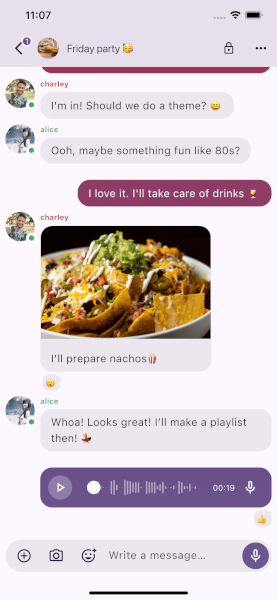
On a phone, FluffyChat is the pick. iOS and Android, fully open source, and it feels like Telegram, which is another way of saying your non-technical friends won’t need a walkthrough.
FluffyChat does everything well, including calls.
Element, the popular default
Element is what most people meet first, and it’s what we install at app.etke.cc alongside every server we manage. We’d rather hand you a working client on day one than a blank screen and a shopping trip.
It’s also where our customers most often tell us they get stuck, and its releases have a habit of breaking things we then get to explain. That’s why we built Komai and brought in Cinny and FluffyChat. Element is one of the most capable clients in the ecosystem, and on mobile it’s still the only one here that can place a call. Capable and pleasant to live in every day turned out to be different things for a lot of the people we host.
At a glance
| Client | Platform | Type | Calls | SSO / OIDC | Notes |
|---|---|---|---|---|---|
| Komai | Desktop: Linux, macOS, Windows | Native | Yes | Yes | Our desktop pick. Room tabs, calls built in. |
| Cinny | Web | Hosted | Yes | Yes | Our web pick. Independent of Element’s codebase. |
| FluffyChat | Mobile: iOS, Android | Native | Yes | Yes | Our phone pick. No in-app calls yet. |
| Element | Desktop, web, mobile | Native and web | Yes | Yes | The popular default, bundled at app.etke.cc. |
That’s where we’ve landed for now. Clients move fast, we re-rank when they do, and this page is where the ranking lives. If we’ve called it wrong for your setup, tell us; we read everything.
Don't have a Matrix server yet?
We specialize in setup, hosting and maintenance of Matrix and various Matrix & non-Matrix add-ons.
Hosting is on affordable VPS servers provided by us (via Hetzner Cloud) in the EU, US and Asia,
or on your own infrastructure anywhere in the world.
Let's build your Matrix haven together!